Buy 掏.com ?
We are moving the project
掏.com .
Are you interested in purchasing the domain
掏.com ?
domain@kv-gmbh.de · 0541-91531010
Buy 掏.com ?
What color is the standard hyperlink?
The standard color for a hyperlink is typically blue. This convention has been widely adopted across the internet to help users easily identify and differentiate links from regular text. However, some websites may choose to customize the color of their hyperlinks to align with their brand or design aesthetic. Nonetheless, blue remains the most commonly recognized color for hyperlinks. **
Why is the hyperlink displayed when printing?
The hyperlink is displayed when printing to provide additional context and information to the reader. It allows the reader to easily access the linked content if they are viewing the printed document electronically. This can be helpful for referencing sources, further reading, or accessing related information. Including hyperlinks when printing also maintains the integrity of the original document and ensures that all relevant information is available to the reader. **

Similar search terms for Hyperlink
Top-Angebote
Products related to Hyperlink:
-
Lennies Toys Catan Junior Board Game 6-9 yrs - Strategy and Commerce for KidsIntroduce your little ones to the world of strategy and commerce with Catan Junior - Board Game. This game is designed for children aged 6-9 and offers a simplified version of the classic game of Catan. Key features include age-appropriate gameplay, engaging components, and social interaction. The game promotes teamwork and communication as children negotiate trades and collaborate with friends and family. It's a great way to bond and create memories during family game nights.29,99 £*Shipping: 3,95 £Secure redirect to the provider
-
York Wallcoverings Exchange Crystal Shore WallpaperExchange's small, unique, fractured lines feel like an artisanal installation rendered in burnished metallic against a textural plaster ground, shown in taupe grey with burnished metallic..170,00 $*Shipping: 0,00 $Secure redirect to the provider




-
What does it mean to create a hyperlink?
Creating a hyperlink means inserting a clickable link within a document or webpage that directs the user to another location, such as another webpage, document, or a specific section within the same document. Hyperlinks are typically highlighted text or images that, when clicked on, take the user to the linked location. This allows for easy navigation between different resources on the internet or within a document. **
-
What is the word for hyperlink in German?
The word for hyperlink in German is "Hyperlink" or "Verknüpfung." Both terms are commonly used in German to refer to a hyperlink, which is a clickable link that directs users to another webpage or resource. **
-
How do I create a hyperlink with Bootstrap?
To create a hyperlink with Bootstrap, you can use the anchor tag `<a>` and apply Bootstrap classes to style it. You can use the `.btn` class to create a styled button link, or use the `.btn-link` class to create a simple text link. Additionally, you can use the `.btn-primary`, `.btn-secondary`, or other color classes to apply different styles to the link. You can also use the `.btn-block` class to make the link fill the width of its container. By combining these classes with the anchor tag, you can easily create styled hyperlinks with Bootstrap. **
-
How can I insert a hyperlink as an attachment?
To insert a hyperlink as an attachment, you can first create the hyperlink in your document or email. Then, you can highlight the text or image that you want to turn into a hyperlink. After that, you can click on the insert/edit link button (usually represented by a chain link icon) and paste the URL of the webpage you want to link to. Finally, you can save or send the document or email with the hyperlink attachment. **


How can one color a line over a hyperlink?
To color a line over a hyperlink, you can use CSS to style the link. You can use the "text-decoration" property and set it to "line-through" to add a line over the hyperlink. Additionally, you can use the "color" property to change the color of the line. For example, you can use the following CSS code: a { text-decoration: line-through; color: red; } This will add a red line over the hyperlink. **
Where can I upload files and share them via hyperlink?
You can upload files and share them via hyperlink on various online platforms such as Google Drive, Dropbox, OneDrive, or Box. These platforms allow you to upload files, generate a shareable link, and then share that link with others. By sending the hyperlink, others can access and download the files you have uploaded. **
Top-Angebote
Products related to Hyperlink:
-
Tools, Home & Hobby Heavy Duty Metal Shopping Baskets With Handles For Retail Stores And Grocery Shopping Heavy Duty Metal Shopping Baskets With Handles For Retail Stores And Grocery ShoppingMake every shopping trip easier with durable metal shopping baskets built to carry more with confidence. Designed for supermarkets, convenience stores, bookstores, and other retail spaces, this 12piece set provides customers with a practical way to...194,97 $*Shipping: 0,00 $Secure redirect to the provider
-
Lennies Toys Catan Junior Board Game 6-9 yrs - Strategy and Commerce for KidsIntroduce your little ones to the world of strategy and commerce with Catan Junior - Board Game. This game is designed for children aged 6-9 and offers a simplified version of the classic game of Catan. Key features include age-appropriate gameplay, engaging components, and social interaction. The game promotes teamwork and communication as children negotiate trades and collaborate with friends and family. It's a great way to bond and create memories during family game nights.29,99 £*Shipping: 3,95 £Secure redirect to the provider
-
What color is the standard hyperlink?
The standard color for a hyperlink is typically blue. This convention has been widely adopted across the internet to help users easily identify and differentiate links from regular text. However, some websites may choose to customize the color of their hyperlinks to align with their brand or design aesthetic. Nonetheless, blue remains the most commonly recognized color for hyperlinks. **
-
Why is the hyperlink displayed when printing?
The hyperlink is displayed when printing to provide additional context and information to the reader. It allows the reader to easily access the linked content if they are viewing the printed document electronically. This can be helpful for referencing sources, further reading, or accessing related information. Including hyperlinks when printing also maintains the integrity of the original document and ensures that all relevant information is available to the reader. **
-
What does it mean to create a hyperlink?
Creating a hyperlink means inserting a clickable link within a document or webpage that directs the user to another location, such as another webpage, document, or a specific section within the same document. Hyperlinks are typically highlighted text or images that, when clicked on, take the user to the linked location. This allows for easy navigation between different resources on the internet or within a document. **
-
What is the word for hyperlink in German?
The word for hyperlink in German is "Hyperlink" or "Verknüpfung." Both terms are commonly used in German to refer to a hyperlink, which is a clickable link that directs users to another webpage or resource. **
Similar search terms for Hyperlink
-
York Wallcoverings Exchange Crystal Shore WallpaperExchange's small, unique, fractured lines feel like an artisanal installation rendered in burnished metallic against a textural plaster ground, shown in taupe grey with burnished metallic..170,00 $*Shipping: 0,00 $Secure redirect to the provider
-
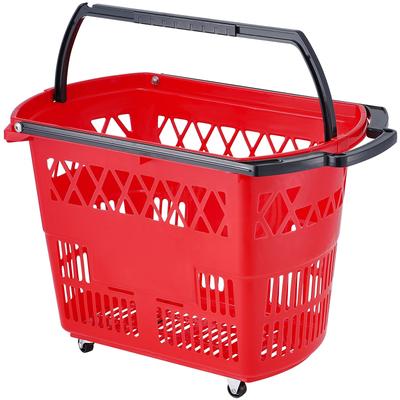
Tools, Home & Hobby 39L Rolling Shopping Basket Set With Wheels And Handles For Grocery Stores And Retail Shops 39L Rolling Shopping Basket Set With Wheels And Handles For Grocery Stores And Retail ShopsMake every shopping trip easier with a spacious rolling shopping basket designed to move heavy purchases with less effort. This 6piece shopping basket with wheels set offers 39L capacity per basket for groceries, retail goods, books, toiletries, and...199,97 $*Shipping: 0,00 $Secure redirect to the provider
-
How do I create a hyperlink with Bootstrap?
To create a hyperlink with Bootstrap, you can use the anchor tag `<a>` and apply Bootstrap classes to style it. You can use the `.btn` class to create a styled button link, or use the `.btn-link` class to create a simple text link. Additionally, you can use the `.btn-primary`, `.btn-secondary`, or other color classes to apply different styles to the link. You can also use the `.btn-block` class to make the link fill the width of its container. By combining these classes with the anchor tag, you can easily create styled hyperlinks with Bootstrap. **
-
How can I insert a hyperlink as an attachment?
To insert a hyperlink as an attachment, you can first create the hyperlink in your document or email. Then, you can highlight the text or image that you want to turn into a hyperlink. After that, you can click on the insert/edit link button (usually represented by a chain link icon) and paste the URL of the webpage you want to link to. Finally, you can save or send the document or email with the hyperlink attachment. **
-
How can one color a line over a hyperlink?
To color a line over a hyperlink, you can use CSS to style the link. You can use the "text-decoration" property and set it to "line-through" to add a line over the hyperlink. Additionally, you can use the "color" property to change the color of the line. For example, you can use the following CSS code: a { text-decoration: line-through; color: red; } This will add a red line over the hyperlink. **
-
Where can I upload files and share them via hyperlink?
You can upload files and share them via hyperlink on various online platforms such as Google Drive, Dropbox, OneDrive, or Box. These platforms allow you to upload files, generate a shareable link, and then share that link with others. By sending the hyperlink, others can access and download the files you have uploaded. **
* All prices are inclusive of VAT and, if applicable, plus shipping costs. The offer information is based on the details provided by the respective shop and is updated through automated processes. Real-time updates do not occur, so deviations can occur in individual cases. ** Note: Parts of this content were created by AI.